
A rep finishes a customer call, support has an open ticket on the same account, and the next move still lives in someone’s notes. That gap slows deals, weakens handoffs, and leaves managers playing detective during pipeline reviews. The best agent assist platforms for CRM integration close it by bringing summaries, suggested replies, and next steps into the record your team already uses, so reps spend less time chasing context and leaders get a steadier view of what is moving.
We’ll show you what agent assist looks like inside a CRM, which platforms stand out, and how native, connector-based, and custom setups compare. We’ll also cover the features that matter most and how to measure ROI, starting with tools like monday CRM that put AI directly inside the record where sales and service already work.
Try monday CRMWhat is agent assist for CRM integration?
Agent assist for CRM integration drops AI directly into the system your revenue team already uses. Instead of sending reps across multiple tabs, it drops suggestions, summaries, and next steps right inside deal records.
Context switching slows progress. Every time a rep leaves the CRM to hunt for details or open another dashboard, they lose focus. Agent assist removes that drag by dropping AI-generated email drafts and risk alerts right into the daily workflow.
Key benefits of agent assist:
- Spot stalled deals: Identify risks before they cost you the opportunity.
- Generate targeted outreach: Draft personalized emails based on real deal context.
- Automate activity logging: Keep records updated without manual data entry.
The strongest setups support the full revenue cycle through one connected system. That approach replaces patched-together software and keeps deals moving.
9 best agent assist platforms for CRM integration
Agent assist platforms vary significantly. Some place AI natively inside the workspace. Others depend on connectors that lag or fail when you need them most. The right choice matches how your team already sells, supports customers, and works together.
We built this list by looking at how closely each platform ties into active workflows. Below, you’ll find native products, focused add-ons, and hybrid options built to cut friction for revenue teams. Use the comparison table to narrow down the best fit.
| Platform | Use case | CRM integration type | Key AI capability |
|---|---|---|---|
| monday CRM | Revenue teams needing to accelerate sales and get pipeline visibility | Native | Automate client communication, summarize timelines, and autofill data |
| Intercom | Support teams needing AI-assisted ticket resolution | Native + connector | AI copilot, suggested replies |
| Zendesk | Enterprise support teams with complex routing needs | Native + connector | AI triage, macro suggestions |
| Balto | Contact center reps needing real-time call guidance | Connector | Live call coaching, compliance alerts |
| Cresta | Sales and service teams using AI for conversation intelligence | Connector | Real-time coaching, deal insights |
| Observe.AI | QA and coaching teams analyzing recorded calls | Connector | Post-call analysis, agent scoring |
| Freshdesk | SMBs wanting affordable AI-assisted support | Native | AI-suggested responses |
| Kustomer | High-volume CX teams needing AI across channels | Native | Omnichannel AI, intent detection |
| Salesforce Service Cloud | Enterprise teams already in the Salesforce ecosystem | Native | AI next-best-action |
1. monday CRM
Best for: Revenue teams that want AI built directly into their sales pipeline.
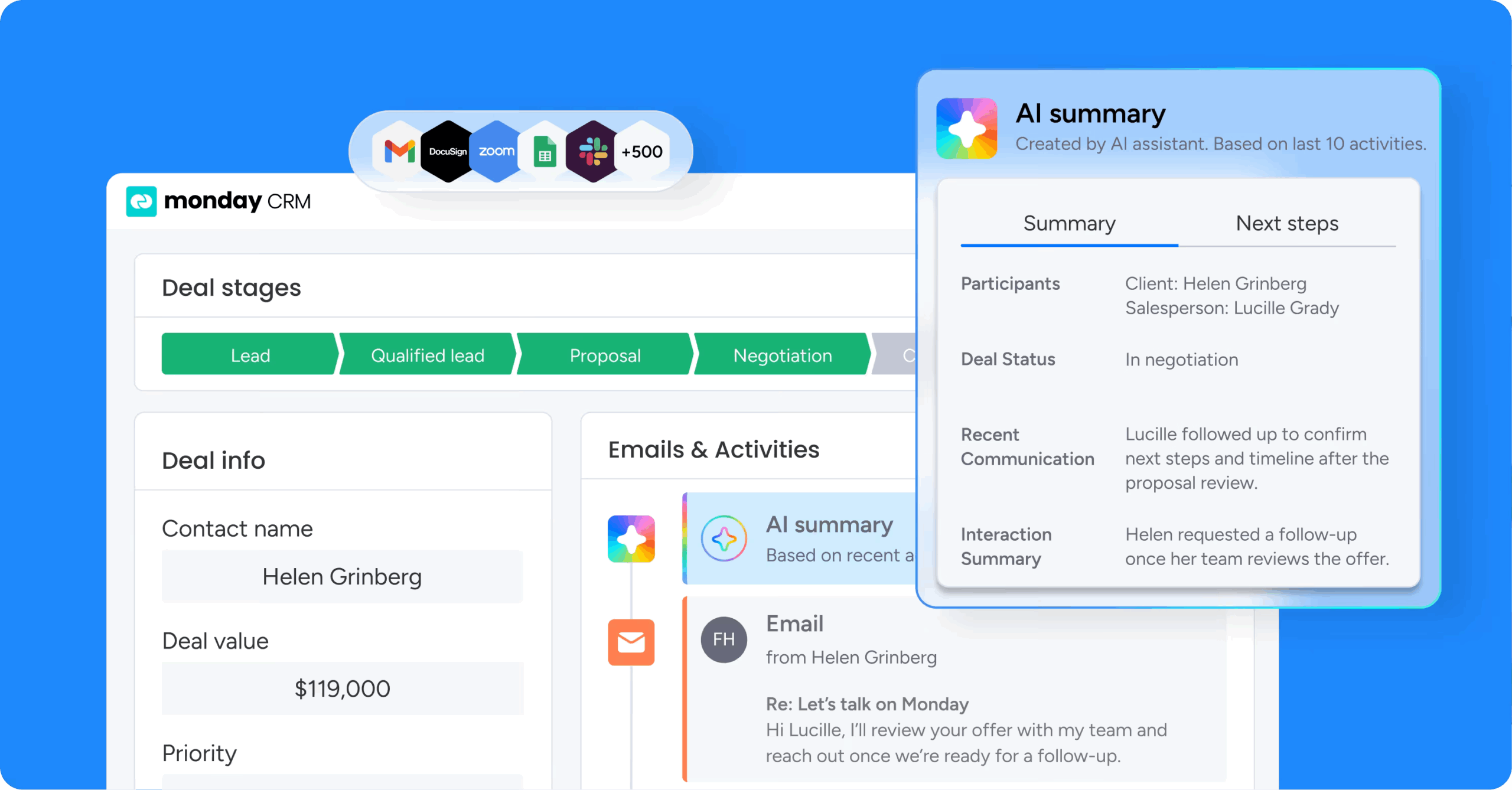
Plenty of CRMs treat AI like an add-on. monday CRM takes the opposite route by embedding it inside Emails & Activities and directly on CRM boards, so reps get help where the work already happens. Teams use it to manage leads, deals, and accounts in one connected workspace.
Use case
For revenue teams, monday CRM creates a single place to capture and qualify leads, manage deals through a visual pipeline, and tie every email, meeting note, and update back to the correct account.
Key features
- AI email assistant: Reps can compose emails directly in Emails & Activities using AI, with the conversation history and CRM record right there.
- Timeline summarization: AI Timeline Summary turns a long trail of emails, calls, meetings, and notes into a short summary.
- Autofill columns with AI: Admins can apply AI actions to columns on any monday CRM board, including Detect sentiment, Extract information, and Assign person.
Pricing
monday CRM offers Basic, Standard, Pro, and Enterprise plans, with AI features available on Standard, Pro, and Enterprise. A free trial is available so you can test the platform before committing.
Why it stands out
- AI where reps already work: monday CRM brings AI into Emails & Activities and board columns, where the work already happens.
- Built for real revenue workflows: Teams use monday CRM for lead management, deal management, and post-sales account management.
2. Intercom
Best for: Support and customer success teams that want AI-assisted replies inside one inbox.

For support teams that live in the inbox, Intercom layers AI assistance directly into day-to-day work. It gives agents help where conversations already happen, so they can respond faster without leaving the thread.
Use case
Intercom fits support and customer success teams that want AI-assisted replies and knowledge retrieval inside one inbox.
Key features
- AI-suggested replies: Fin AI Copilot retrieves contextually relevant answers from your knowledge baseas agents type.
- Conversation summarization: Agents receive AI-generated summaries of long threads before responding.
- Real-time knowledge retrieval: Fin AI Copilot pulls answers from the knowledge base in real time, so agents spend less time searching.
Pricing
Intercom’s Essential plan costs $29/seat/month and the Advanced plan costs $85/seat/month, both billed annually. The Copilot add-on costs $29/agent/month (billed annually) for unlimited usage.
Considerations
- Sales teams using Intercom as a primary CRM may find it limited for pipeline management compared to dedicated CRM software.
3. Zendesk
Best for: Enterprise support teams managing high ticket volumes across multiple channels.

Zendesk has long been a support staple, and its agent assist capabilities follow that same pattern. The Copilot add-on places those capabilities inside the agent workflow.
Use case
Zendesk works well for support teams that want AI-assisted ticket resolution and automated routing, particularly enterprise teams managing high ticket volumes across multiple channels.
Key features
- AI triage and routing: Automatically classifies and routes incoming tickets by intent and urgency.
- Auto assist (agent copilot): Reads the ticket and tees up suggested replies right in the composer.
- Macro suggestions: Recommends the most relevant macros based on ticket context, so agents resolve common issues faster.
Pricing
Zendesk’s Suite Professional plan starts at $115/agent/month (billed annually), and the Copilot add-on costs an additional $50/agent/month (billed annually). A free trial is available so you can test the platform before committing.
Considerations
- The Copilot add-on raises the per-agent cost significantly on top of the base plan.
- Complex routing and configuration can require dedicated admin time to maintain.
4. Balto
Best for: Contact center teams that need real-time AI guidance during live calls.
Balto is built for live calls, not after-the-fact analysis. It listens to customer conversations as they happen and gives agents AI-powered guidance in the moment.
Use case
Balto helps contact center teams lower compliance risk by providing live AI guidance during calls.It fits teams running softphone and CCaaS environments, but it’s not built for Chromebooks or Windows-on-ARM devices.
Key features
- AI Answers: Pulls relevant responses from connected knowledge sources in real time.
- AI Checklist: Automatically tracks required disclosures during a call.
- Live call coaching: Surfaces in-the-moment prompts based on what the customer is saying.
- Compliance alerts: Flags missed steps before the call ends.
Pricing
Balto uses quote-based pricing, charged per agent, per month. You’ll need to contact the Balto team for plan details, and no free trial or free plan is listed.
Considerations
- It is built for voice calls, so it offers little support for email or chat workflows.
- Connector-based CRM integration may introduce sync delays compared to native options.
5. Cresta
Best for: High-volume enterprise contact centers that need real-time agent guidance.

Cresta adds a layer of real-time AI coaching on top of existing enterprise systems. Designed for Fortune 1000-scale operations, it works alongside your CRM and contact center stack.
Use case
Cresta is aimed at high-volume enterprise contact centers that need real-time agent guidance and conversation intelligence.Smaller organizations will likely find the platform oversized for their needs.
Key features
- Behavioral guidance: AI surfaces real-time hints and workflows triggered by live conversation signals.
- AI summaries: After-call summaries auto-populate connected CRM systems.
- Deal insights: Conversation data highlights patterns that affect outcomes across sales and service teams.
Pricing
Cresta offers custom, quote-only pricing, so you’ll need to request a quote from its sales team. No free trial or free plan is listed.
Considerations
- The platform is scaled for large enterprises and may be more than smaller teams need.
- Quote-only pricing makes early budgeting and comparison harder.
6. Observe.AI
Best for: Enterprise contact center teams that need AI-driven QA and coaching at scale.
Observe.AI focuses on turning contact center conversations into coaching signals and compliance insight. Enterprise organizations use it to evaluate agent performance across large volumes of calls.
Use case
Observe.AI is best suited to enterprise contact center leaders who need to maintain compliance and deliver focused coaching.It fits teams that want to analyze recorded conversations and turn them into clear performance feedback.
Key features
- Real-time Agent Assist: Feeds reps in-the-moment guidance during active interactions.
- Post-call AI scoring: Automatically evaluates every agent interaction against defined criteria.
- Conversation intelligence: Analyzes calls to surface coaching opportunities and compliance risks.
Pricing
Observe.AI uses custom, quote-only pricing, so you’ll need to contact its sales team for details on plans. No free trial or free plan is listed, which means early evaluation can take longer.
Considerations
- The focus on QA and coaching means it offers limited value for sales pipeline management.
- Connector-based CRM integration requires setup and ongoing sync monitoring.
7. Freshdesk
Best for: Support teams that want affordable AI-assisted ticket handling, especially within the Freshworks ecosystem.
Freshdesk brings AI assistance into the support queue through Freddy AI, giving agents help without forcing them to jump between systems.
Use case
Freshdesk is a strong fit for support teams that want AI-assisted ticket handling, particularly if they already run other Freshworks products.
Key features
- Freddy AI Copilot: Embedded directly in the agent workspace, Copilot helps agents resolve tickets faster.
- Conversation summaries: Freddy AI condenses long ticket threads so agents can get up to speed quickly.
- Suggested replies: AI drafts responses based on ticket context for agents to review and send.
- Freshsales CRM integration: Native sync with Freshsales for teams running the full Freshworks stack.
Pricing
Freshdesk’s Pro plan costs $55/agent/month (billed annually), and the Freddy AI Copilot add-on costs an additional $29/agent/month. Copilot is only available as a paid add-on on Pro and Enterprise plans.
Considerations
- Copilot is only offered as a paid add-on on higher-tier plans.
- Teams outside the Freshworks ecosystem may find CRM integration less seamless.
8. Kustomer
Best for: High-volume customer service teams that want AI built into a CRM-native workspace.

Kustomer combines AI-powered agent assistance with a CRM built for high-volume customer service. Email, chat, social, and voice all feed into one workspace, so agents see the full customer story in one place.
Use case
Kustomer is used by high-volume customer service teams that want faster resolutions with AI embedded alongside CRM-native context.It is built for customer service rather than sales pipeline management.
Key features
- Envoy (AI for reps): Kustomer’s agent-facing AI drafts replies and suggests next steps.
- Omnichannel AI: AI assistance works across email, chat, social, and voice in the same workspace.
- Intent detection: AI identifies what customers are asking for so conversations reach the right agent faster.
- Unified customer timeline: Every interaction lives in one view, giving AI and agents full context.
Pricing
Kustomer uses quote-based pricing, so you’ll need to contact its sales team for plan details. It offers an ROI calculator to estimate potential savings, but no free trial or free plan is listed.
Considerations
- It is designed for customer service, so sales teams may find pipeline tools limited.
- Without a free trial, hands-on evaluation requires working with the sales team.
9. Salesforce Service Cloud
Best for: Large enterprises that want AI-assisted service operations inside an existing Salesforce environment.
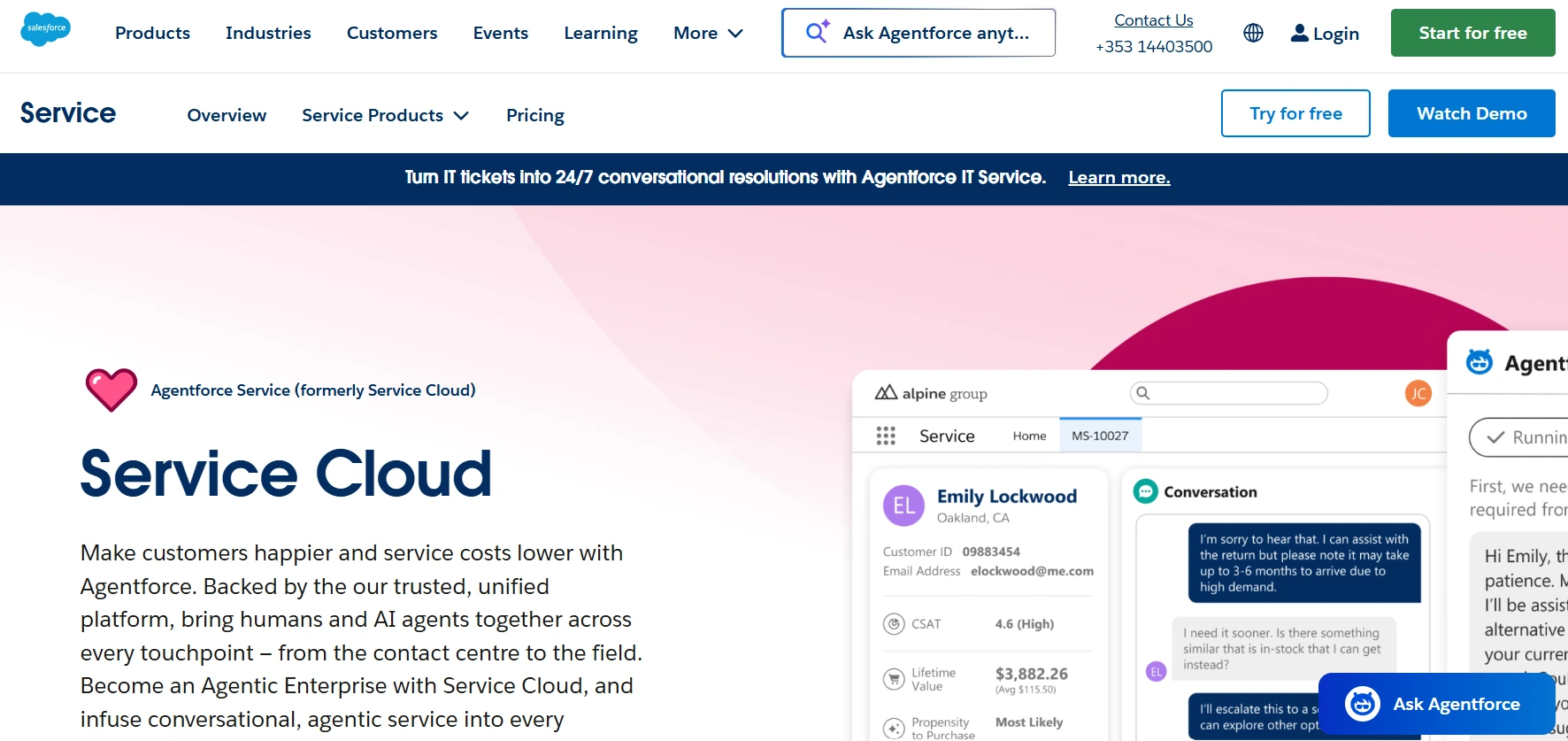
Within the Salesforce ecosystem, Service Cloud is the obvious route for AI-assisted service operations. It embeds agent assist directly into the CRM, though it is enterprise-grade in both capability and complexity.
Use case
Salesforce Service Cloud makes sense for large enterprises that want AI-assisted service operations tightly connected to an existing Salesforce CRM environment.Organizations should factor in significant onboarding time and cost.
Key features
- Einstein next-best-action: AI analyzes case context to recommend the most relevant response.
- Case summarization: AI generates concise summaries of long case histories.
- Native CRM context: AI recommendations draw on customer data already stored in your Salesforce records.
Pricing
Salesforce Service Cloud’s Pro Suite plan costs $100/user/month, and the Enterprise plan costs $175/user/month, both on annual contracts. A free trial is available so you can test the platform before committing.
Considerations
- Implementation typically demands significant onboarding time, configuration, and cost.
- Its value is highest for teams already invested in the Salesforce ecosystem.
Agent assist vs. AI agents vs. chatbots
Vendor marketing tends to blur these categories until every term sounds interchangeable. Before evaluating any tool, it helps to pin down what each label means so you buy the system that matches your workflow. The table below breaks down how each one works, who it serves, and where it fits.
| Type | How it works | Who it serves | Best for |
|---|---|---|---|
| Agent assist | Works alongside a human rep in real time to surface suggestions and next-best actions directly inside your CRM | Sales and service reps | Keeping reps focused with in-the-moment guidance |
| AI agents | Operate autonomously, taking action independently at each step | Revenue and operations teams | Background workflows like evaluating incoming leads, generating structured meeting notes, and flagging pipeline risks in monday CRM |
| Chatbots | Handle customer-facing conversations to deflect volume before it reaches your team | Customers | Reducing inbound ticket and inquiry volume |
| Copilots | Respond when prompted to help with specific workflows, like summarizing a deal or drafting an email, but never proactively surface information | Individual reps and managers | On-demand help with specific tasks |
Native, connector, or custom-built integrations
Selecting a CRM integration strategy is more than a technical checkbox. It determines how well your AI performs, how fast information moves, and how much ongoing maintenance your team inherits.
How much extra fragility are you willing to accept?
| Integration type | Setup time | Data depth | Maintenance burden | Use case |
|---|---|---|---|---|
| Native | Minimal | Full, real-time | Low | Teams wanting everything in one system |
| Connector | Days to weeks | Partial, with sync delay | Medium | Teams using specialized tools |
| Custom API | Weeks to months | Configurable | High | Enterprise teams with unique requirements |
This choice shapes daily execution. The integration model you choose often determines whether AI reduces busywork for reps or adds another operational burden.
7 features that matter most for CRM agent assist
AI features do not all deserve a place in your team’s everyday workflow. The most useful ones share a simple quality: they shorten the distance between insight and action.
A better question than “does this feature exist?” is “does it work naturally inside the workspace our team already uses?” The strongest capabilities tackle real sources of friction rather than adding novelty for its own sake.
Here are the seven features that consistently matter most for sales teams:
- Real-time suggestions: AI points to the next move that matters most the moment a rep opens a deal record, from a follow-up question to a risk flag. Native integration gives it the deal stages, contact history, and email threads it needs to be accurate.
- Automated call and meeting summarization: Structured notes capture what was discussed, what was agreed, and what happens next, so forecasts rest on field activity rather than memory. monday CRM condenses communication history into a scannable summary, which cuts admin work and speeds up handoffs.
- Auto-logging and real-time CRM writeback: The system records calls and emails and pushes next steps and buying signals straight into the record. Native platforms write data in real time, while third-party connectors introduce sync lag.
- Context-aware AI email drafting and sequences: An AI sales assistant generates tailored emails based on contact history, deal stage, and buyer intent. Smart sequences keep follow-ups on schedule, and teams can run multi-touch outreach with an outreach sales agent straight from activity timelines in monday CRM.
- Seamless cross-functional handoffs: A shared record keeps every call, email thread, and past objection in one place, so a customer success manager taking over an account sees the full story. The workspace itself becomes the handoff document.
- Strict permissions and human-in-the-loop controls: Admins decide what the AI can access and what requires human approval, so a rep reviews every draft before it sends. monday CRM supports this with admin-enabled controls and role-based permissions.
- No-code customization: Customizable CRM software adapts to your pipeline stages, qualification rules, and handoff logic without waiting on engineering. Teams use monday CRM as a no-code CRM to set behaviors through plain-language instructions.
5 steps to choose agent assist platforms that fit your revenue team
Start by defining the real problem, then let the demo confirm whether the product solves it. Are you fixing a workflow issue, or signing up for another platform your team barely touches? This framework keeps the evaluation grounded in what helps reps close faster.
Step 1: Map your team’s biggest bottlenecks
Start with the workflow, not the vendor. Identify where your team actually loses time, because those bottlenecks decide which features matter. Manual call logging calls for auto-logging and direct CRM writebacks, slow follow-ups call for AI email drafting and sequences, and missing context calls for timeline summaries and real-time suggestions.
Step 2: Decide between native and bolt-on
This choice shapes everything that follows. Native solutions offer lower friction and a single source of truth, while bolt-on platforms add specialized extras but introduce integration complexity and more points where data can lose fidelity. For teams that want pipeline management, AI, and communication in one place, native generally makes more sense.
Step 3: Test integration depth with your CRM
A pricing page that says “integrates with your CRM” tells you very little. Run a proof-of-concept with real data to confirm the platform reads and writes the right fields, since a tool that only syncs contact names is not a deep integration. The goal is CRM automation AI that writes call outcomes, sentiment scores, and next steps to custom fields in real time.
Step 4: Check permissions and governance controls
Security often gets attention too late. Confirm that reps only see AI-generated insights for accounts they own, that admins can disable specific features, and that you can opt out of external model training. In regulated environments, settle these checks before signing the contract.
Step 5: Run a pilot with baseline KPIs
Set two or three measurable KPIs before the pilot starts, such as time spent on data entry, email response times, or pipeline completeness. Run it for a few weeks with a subset of the team and compare results against your baseline. A 40% reduction in manual logging gives leadership a defensible business case, and teams often see stronger results when they use monday CRM to automatically capture client communication and summarize action items.
How to measure ROI on agent assist and CRM integration
Agent assist can look great in a short demo. The harder question is how you show financial impact in a budget meeting three months after rollout.
A useful ROI model goes beyond one headline number. The value usually shows up in three areas.
Key areas to measure:
- Time savings: Track the hours reps spend on manual data entry before and after implementation. If 20 reps each save two hours a week, you recover thousands of hours a year for selling.
- Data quality: Measure field completion rates and timeline accuracy to see if your forecasts are trustworthy. Revenue teams use monday CRM to capture these details automatically, turning messy pipelines into reliable insights.
- Revenue impact: Watch deal velocity and pipeline coverage to see if the same headcount can manage more active opportunities.
Review progress every 90 days against your baseline KPIs, and the impact will become clear.
Why monday CRM is built for agent assist inside the revenue workflow
Many agent assist tools start in the contact center and connect back to the CRM through layers of integration. That setup often brings sync lag, brittle field mappings, and extra complexity for the reps who rely on it.
monday CRM takes a different approach. AI works directly inside the workspace, reading from and writing to the same record in real time, so reps get help right where they already sell and keep the full context of every deal.
AI Timeline Summary
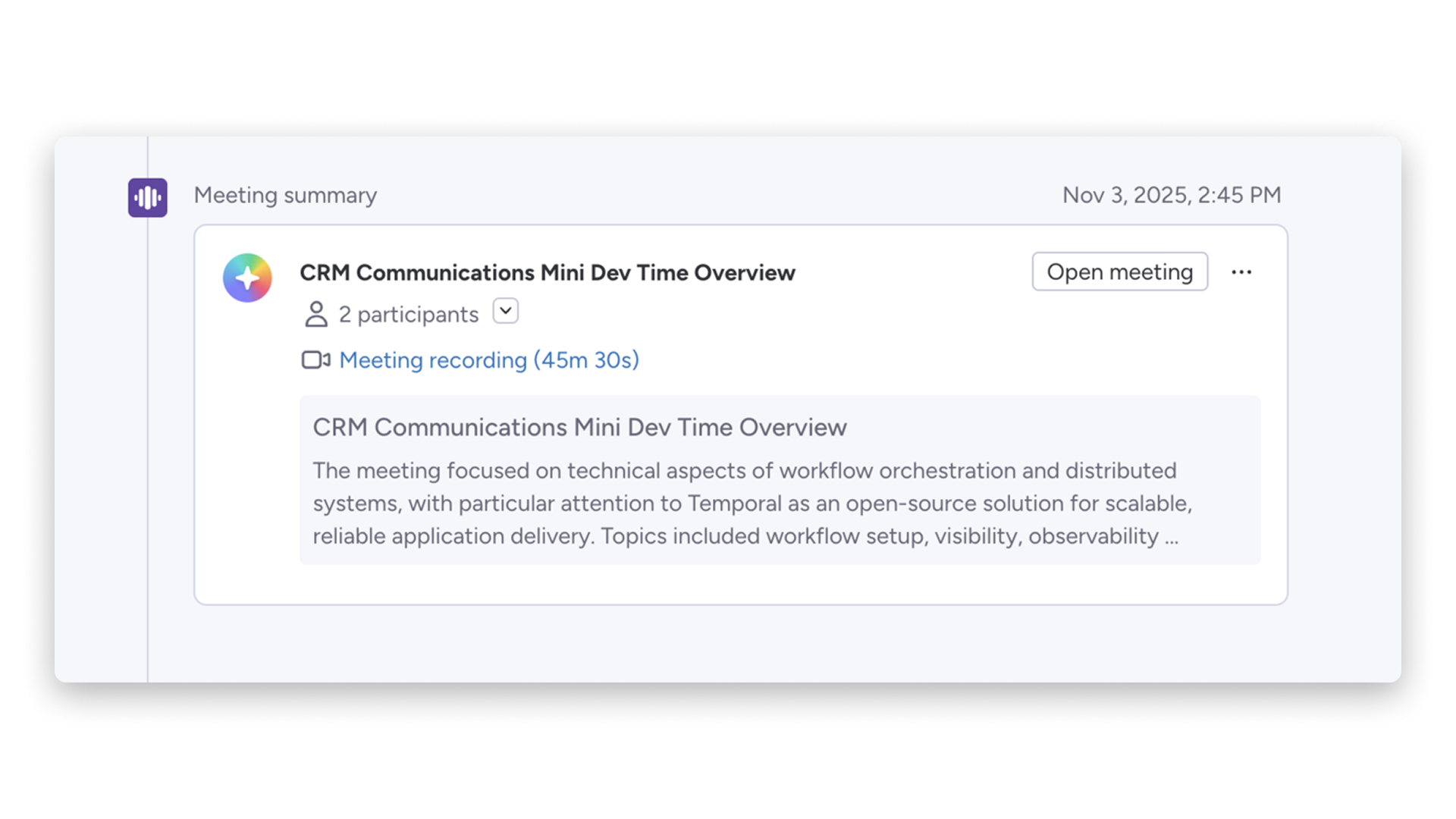
AI Timeline Summary turns a long trail of emails, calls, meetings, and notes into a short account brief. Any rep, manager, or customer success teammate can get up to speed before a call without digging through months of activity, which makes handoffs between sales and service much faster.
AI email assistant
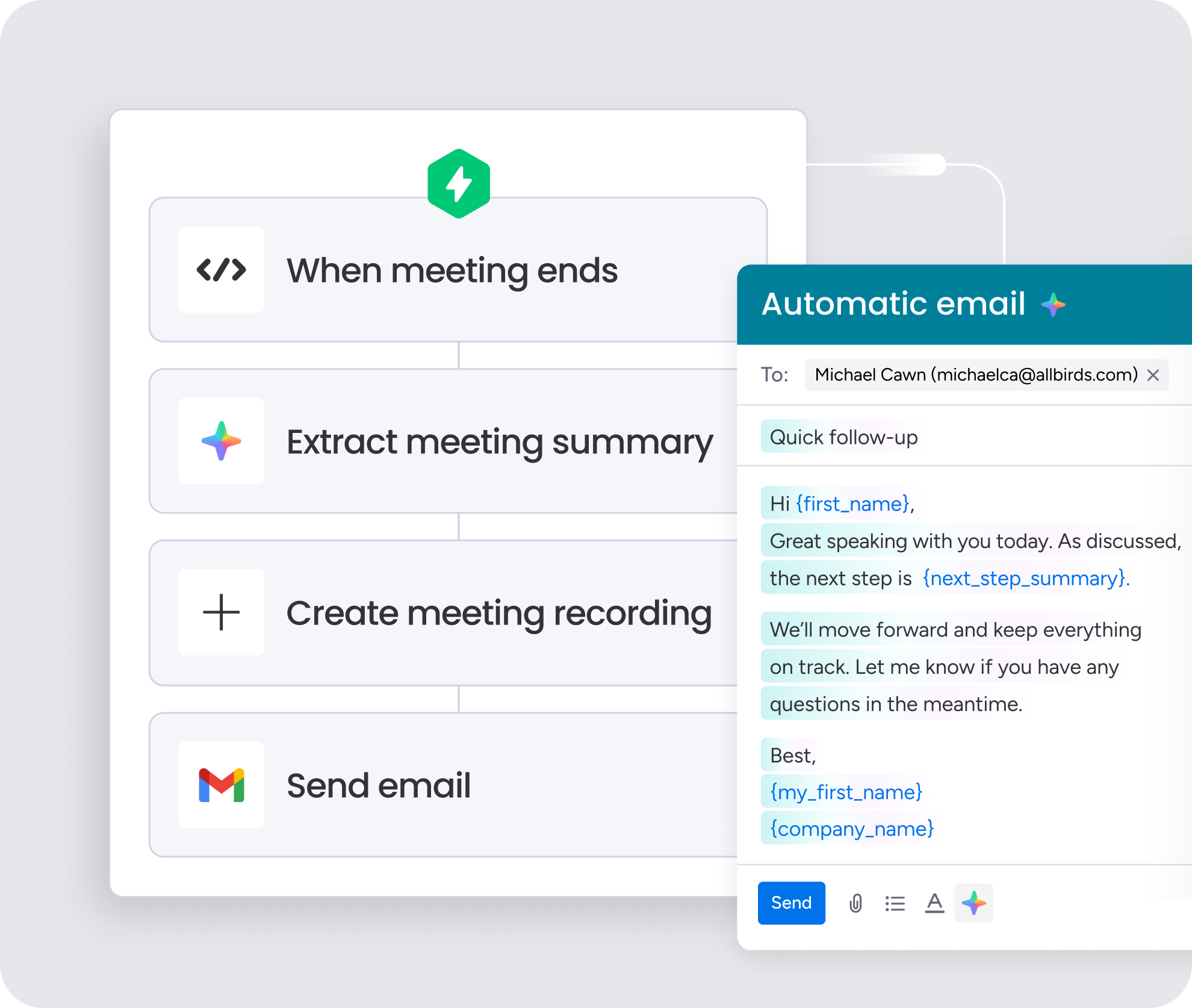
Reps can draft emails with AI directly in Emails & Activities, with the full conversation history and deal record right beside them. Because suggestions draw on real deal context, replies stay relevant to the actual conversation, and reps spend less time switching tabs to find the details they need.
Autofill columns with AI
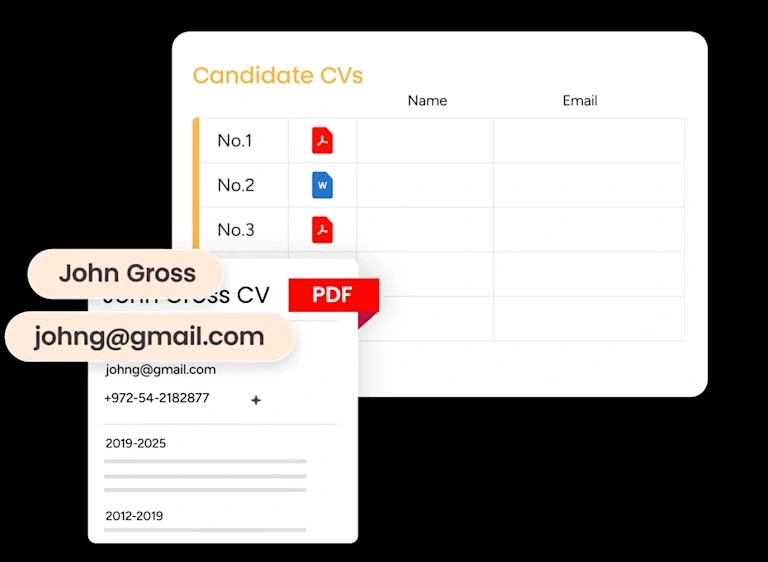
Admins can apply AI actions to columns on any CRM board, such as Detect sentiment, Extract information, and Assign person. Inbound emails and updates get categorized and enriched automatically, so the record stays accurate without manual data entry and service issues surface before they stall a deal.
Custom AI Blocks
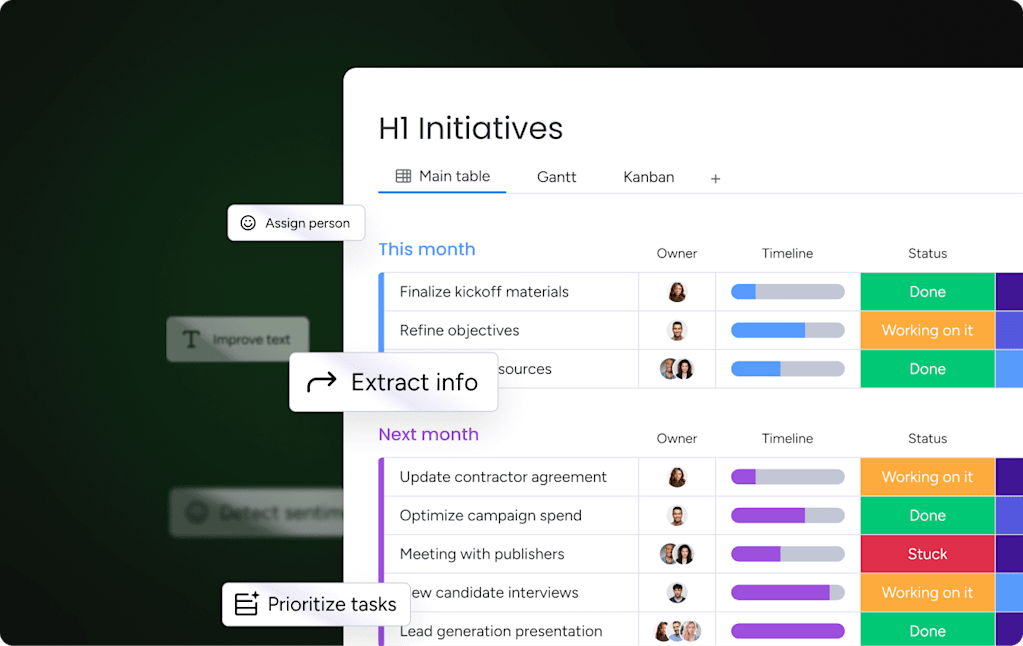
AI Blocks let teams define, in plain language, exactly how the system should handle a record. As new information enters the pipeline, those instructions run automatically through the no-code automation builder, so summarizing, categorizing, and handoff steps happen without engineering support.
Transforming revenue operations with agent assist
In sales, context drives everything, yet many teams lose it the moment a deal crosses departments. The fix is not the platform with the longest feature list. It is keeping data clean, teams aligned, and workflows moving without manual friction. When an AI-powered CRM embeds AI directly into the workflow, reps get real-time guidance without leaving the system, and sales, service, and operations all work from the same source of truth.
Evaluate your bottlenecks and test for true native integration before you commit. Revenue teams use monday CRM to unify their operation, smooth out handoffs, and keep opportunities advancing, so try monday CRM to see how AI-native workflows help your team close.
Try monday CRMFAQs
What is the difference between agent assist and a CRM?
The main difference between agent assist and a CRM is that agent assist uses AI to offer real-time suggestions, while a CRM acts as your central system of record for customer data. They work best together, especially when agent assist is embedded directly into your CRM workflow to keep teams focused in one place.
Can agent assist tools integrate with any CRM?
Agent assist tools can integrate with most major CRMs via APIs, though the depth of that connection varies significantly from basic contact syncing to full conversation transcripts. Native integrations offer the deepest connection with zero sync delay, so always verify how much data actually transfers before committing.
How much does agent assist for CRM integration cost?
The cost of agent assist for CRM integration depends heavily on the setup type, feature set, and your team size. Platforms like monday CRM include AI capabilities directly within their standard plans, whereas standalone tools often charge an extra monthly fee per user.
Do agent assist tools work for both sales and service teams?
Agent assist tools work for both sales and service teams when you choose a unified platform rather than a system built exclusively for contact centers. With monday CRM, cross-functional context flows effortlessly from sales straight to customer success without any manual handoff documents.
What is the ROI of implementing agent assist in a CRM?
The ROI of implementing agent assist in a CRM typically shows up through massive time savings on manual logging, cleaner pipeline data, and faster deal velocity. You can expect measurable efficiency gains within the first 30 days and a clear revenue impact within a full quarter.
How do I know if my team needs agent assist or AI agents?
You know your team needs agent assist if human reps require real-time suggestions during calls, whereas AI sales agents are necessary for autonomously executing background workflows like scoring leads. Most teams rely on both to handle repetitive processes automatically while keeping a human touch on critical interactions.