
Month-end shouldn’t feel like a scavenger hunt through closed-won reports, payout tabs, and Slack threads. Yet many revenue teams still rely on manual checks and fragile formulas, which is why commission tracking software matters. It connects deal data to payout logic, gives reps a live view of earnings, and helps RevOps and finance work from the same numbers.
This article covers what commission tracking software does, the features worth prioritizing, and 7 platforms to consider in 2026, including monday CRM, plus 6 steps to choose the right fit and habits that keep payouts accurate as your team grows.
Key takeaways
- Single source of truth: Commission tracking software connects deal data directly to payout logic, so sales, RevOps, and finance all work from the same numbers.
- Rep trust: Live earnings visibility and clear calculation logic reduce disputes and stop reps from building their own shadow spreadsheets.
- Right-sized platform: Match the tool to your compensation plan complexity, from simple CRM-native tracking to enterprise-grade incentive compensation management.
- Features that matter: Prioritize deep integrations, AI anomaly detection, no-code plan flexibility, real-time dashboards, and audit trails.
- Accuracy by design: Gate data quality, run parallel tests with real comp data, and document plan versions to keep payouts accurate as your team grows.
What is commission tracking software?
Commission tracking software automates the calculation, recording, and reporting of sales payouts. Instead of manually checking closed deals against a complicated compensation plan, the system pulls information straight from your CRM software, producing accurate, instant payout statements with almost no room for disputes. Reps can monitor earnings in real time, RevOps can update plans without untangling fragile formulas, and finance can reconcile payouts against payroll on schedule.
The core issue goes beyond arithmetic: this software solves for trust. Once reps stop trusting the official numbers, they waste selling time building their own shadow trackers. A dedicated platform creates one shared source of truth and turns a reconciliation process that once dragged on for days into something quick and manageable.
How commission tracking software fits into your revenue stack
Buy software without understanding its role in your revenue stack, and you’ll easily end up paying enterprise prices for capabilities your team never uses. The category spans everything from lightweight tools built for flat-rate plans to heavyweight incentive compensation management platforms designed for multi-territory enterprises. Choosing the right tier for your current needs helps you avoid an expensive and disruptive switch later.
Matching platform complexity to your compensation plan
Revenue teams generally land in one of three buckets, and each comes with a very different level of complexity and cost. So what do you actually need? Here’s how the market typically segments.
| Platform category | Best fit for | Key capabilities |
|---|---|---|
| Commission tracking apps | SMBs and teams under 50 reps | Calculate and report commissions from deal data using simple flat-rate or tiered plans. |
| Incentive compensation management (ICM) | Mid-market to enterprise teams | Manage complex multi-variable plans, modeling, and compliance across multiple territories. |
| Sales performance management (SPM) | Large enterprises | Combine ICM with quota management, territory planning, and coaching for full orchestration. |
Aligning platform complexity with the reality of your compensation plan keeps spend under control and makes adoption far more likely. Don’t shop for the company you hope to become five years from now. Buy for the team closing business today.
Why CRM-native commission tracking simplifies payouts
A standalone commission platform isn’t mandatory for every business. If your plans are relatively simple, the workspace already housing your deal data can double as an effective payout foundation. Why introduce another system if commissions can live where your team already works?
Many revenue teams use monday CRM to build commission tracking workflows directly on top of active deal data. With customizable boards and Formula Columns, closed-won amounts, rep ownership, and product lines connect immediately. For teams trying to reduce platform sprawl, eliminate sync delays, and keep visibility high, it is a practical place to start.
Signs your team has outgrown spreadsheet tracking
Spreadsheets work well until your team’s process outgrows them. How much time disappears each month because of manual mistakes? If these signals sound familiar, your team’s ready for a dedicated platform:
- Shadow spreadsheets emerge: Once reps stop trusting the official numbers, they start maintaining their own records. That points to a transparency issue more than a workflow issue.
- Month-end reconciliation drags on: Manual calculations slow payroll and introduce significant finance risk. They also consume time your team should be using to sell.
- Commission disputes happen frequently: Repeated disputes usually mean the calculation logic is too opaque. Reps struggle to see how the numbers were produced, and finance has a hard time defending the math.
- Compensation plans get complicated: Tiered rates, accelerators, and split credits are extremely difficult to manage accurately in spreadsheets. Formula errors and version control challenges tend to compound quickly.
- Headcount outpaces your process: A process that works for five reps tends to fail quickly at 20. As your organization grows, manual systems multiply mistakes rather than containing them.
5 features to look for in commission tracking software
Commission tracking platforms aren’t interchangeable. A small team on a flat-rate plan has little in common with a multi-territory organization juggling accelerators and quarterly kickers. Before comparing vendors, separate the features your team truly needs from the ones you can safely skip.
- Deep CRM and payroll integrations: Real-time deal data flowing into commission rules and out to payroll prevents the errors that pile up with manual CSV uploads, and teams using monday CRM get native deal data without sync delays.
- AI-powered anomaly detection: The system should flag a payout that looks wrong, like a rep earning three times their normal commission, before the money goes out.
- No-code plan flexibility: Visual builders let sales ops update accelerators, territories, and rules without waiting in an engineering backlog.
- Real-time rep dashboards: Live earnings by deal and tier, plus pipeline management and projections, build trust and keep reps from maintaining shadow spreadsheets.
- Audit trails and compliance: A full record of each payout’s deal, applied rule, approver, and plan changes keeps disputes short and revenue recognition timing aligned.
7 best commission tracking software platforms
Commission plans are hard enough without fighting the software too. Some platforms are designed for enterprise-scale complexity; others are simply there to pull a growing team out of spreadsheet disorder. The right fit depends on how often your payout structures change and how much visibility your reps need.
How much of your team’s time should really go toward managing commissions? We broke down the leading options below to shorten your research. Use this guide to narrow the field and focus on platforms that match your revenue team’s needs.
| Platform | Use case | Complexity level | Starting price |
|---|---|---|---|
| monday CRM | Revenue teams wanting CRM-native tracking with complete flexibility | Low–medium | From $12/seat/month |
| Everstage | Mid-market sales teams wanting rep-facing visibility and gamification | Medium | Custom pricing |
| CaptivateIQ | RevOps teams managing complex, frequently changing comp plans | Medium–high | Custom pricing |
| QuotaPath | SMB and mid-market teams graduating from spreadsheets | Low–medium | From $25/user/month |
| Salesforce Spiff | Teams already on Salesforce wanting native commission tracking | Medium | Custom pricing |
| Xactly | Enterprise teams with multi-variable, multi-territory comp plans | High | Custom pricing |
| Performio | Mid-market to enterprise teams needing strong audit trails | Medium–high | Custom pricing |
1. monday CRM
Best for: Revenue teams that want commission tracking built directly into their CRM.
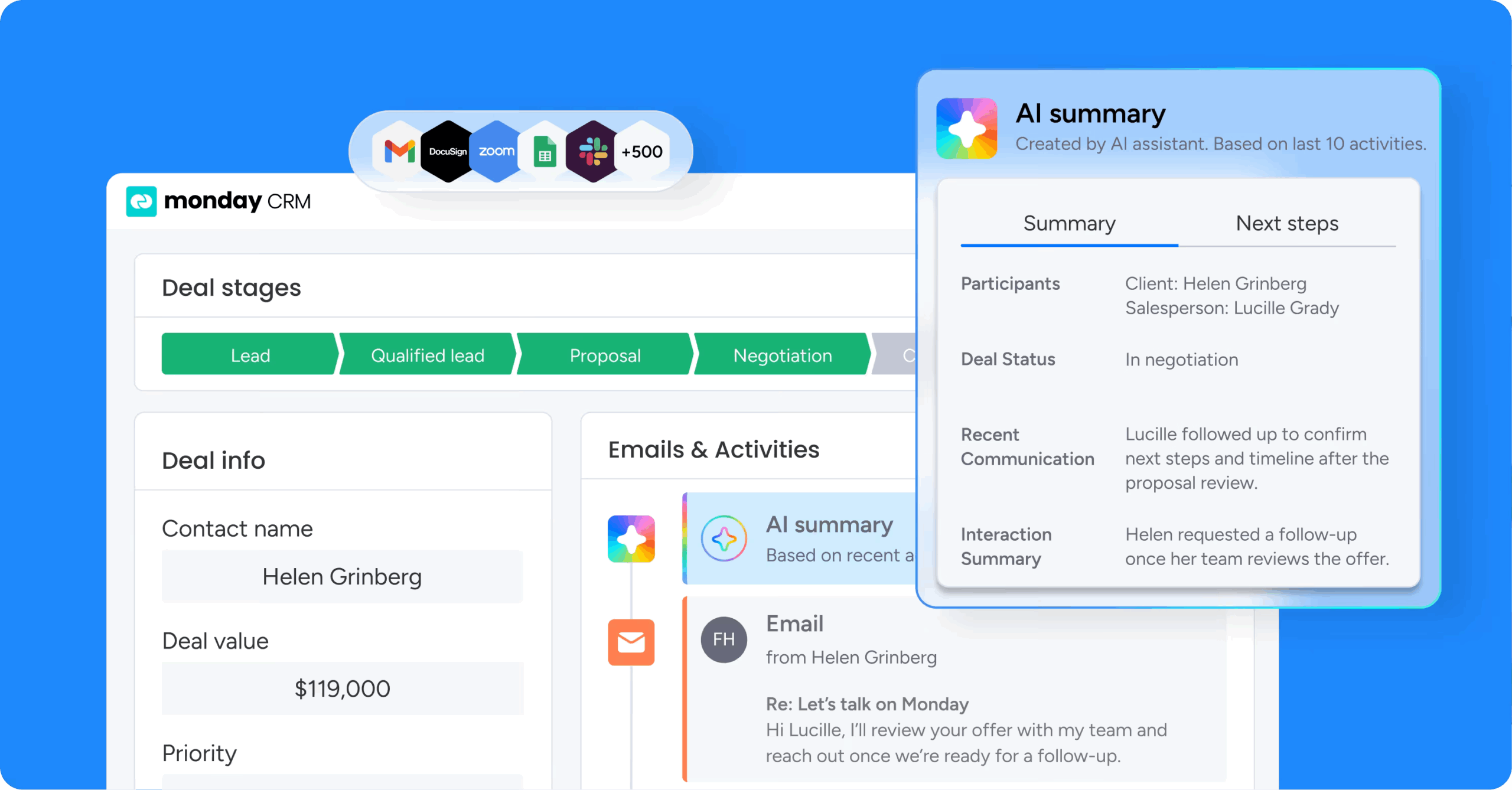
monday CRM brings leads, accounts, contacts, and deals into one system, so commission tracking can live alongside the deals that generate it. For teams with low-to-medium plan complexity, that shared workspace keeps payouts anchored to live deal data instead of whatever spreadsheet version happens to be circulating. It also keeps the commission record tied to the broader customer context, which helps when finance asks which deal triggered a payout.
Use case
monday CRM fits sales and RevOps teams that want commission visibility built directly into the pipeline, with updates happening automatically as deals move and change.
Key features
- AI Blocks for anomaly detection: Flag unusual commission amounts, like a payout that exceeds a set threshold, so you catch errors before they hit payroll.
- AI-powered data extraction and categorization: Pull key terms from contracts or invoices into the deal record and assign deals to the correct commission tier or product line without manual entry.
- Formula Columns on commission boards: Build your compensation logic directly on your deals board, and watch payout amounts update automatically as deals close.
- Real-time dashboards: Build code-free dashboards that give reps live earnings visibility and finance a current view of commission liability.
- monday vibe custom calculators: Turn plain-language prompts into a custom commission calculator and personalized earnings dashboard, with no code required.
Pricing
monday CRM offers paid plans starting at $9/seat/month when billed annually, with higher tiers adding more automation, integrations, and reporting depth. A free trial is available, so teams can test commission workflows with real deal data before committing.
Why it stands out
- Unified workflow: Commission tracking lives alongside the deals that generate it, so sales, RevOps, and finance work from the same live data.
- Less guesswork: Linked boards, dashboards, and automations keep payouts tied to current deal records instead of disconnected spreadsheets.
- Faster setup: No-code customization lets teams build and adjust commission workflows in days rather than months.
2. Everstage
Best for: Mid-market and enterprise sales teams that want commission tracking to motivate reps.
For companies that want commission tracking to motivate sellers instead of just calculating payouts, Everstage leans hard into visibility. Designed for hypergrowth companies and enterprises with 20+ payees, it connects to major CRMs and data sources through live data sync.
Use case
Everstage works well for RevOps, finance, and sales leadership teams that need commission tracking to stay accurate and transparent at scale.
Key features
- Commission Trace: Provides line-by-line calculation visibility so reps and admins can see exactly how every payout was calculated.
- No-code plan builder: Supports tiers, accelerators, cliffs, multi-role splits, SPIFFs, and MBOs without engineering help.
- Live CRM data sync: Connects to major CRMs and data sources so commission calculations update automatically as deals change.
Pricing
Everstage uses custom, quote-only pricing based on the number of payees and the complexity of your compensation plans. Contact the vendor for a tailored quote.
Considerations
- Some rep engagement features, like the embedded Salesforce app and Slack/Teams connectivity, are add-ons rather than included in the core plan.
3. CaptivateIQ
Best for: RevOps and compensation teams managing complex, frequently changing comp plans.
CaptivateIQ automates the full commission lifecycle, from ingesting data to producing real-time payout statements. Aimed at mid-market and enterprise organizations running complex, fast-changing comp structures, it pairs a spreadsheet-familiar interface with enterprise governance controls.
Use case
CaptivateIQ is a strong fit for compensation and RevOps teams managing complex, multi-variable commission plans that require real-time accuracy and full auditability.
Key features
- No-code plan builder: A spreadsheet-style interface with pre-built templates lets admins model and iterate on comp plans without engineering support.
- Built-in governance: Multi-level payout approvals, centralized dispute threads, and audit logs are embedded directly into the workflow.
- Real-time payout statements: Automated data ingestion produces up-to-date statements so reps and finance always see current numbers.
Pricing
CaptivateIQ uses quote-based pricing that depends on the number of payees, plan complexity, and required integrations. Pricing is not publicly listed, so you will need to contact the vendor for details.
Considerations
- Pricing is not publicly listed, and certain compliance features (such as ASC-606 reporting) carry additional costs.
4. QuotaPath
Best for: SMB and mid-market sales teams moving beyond spreadsheets.
QuotaPath focuses on making commission tracking manageable for growing revenue teams that have outgrown manual spreadsheets. It supports common comp models and gives reps earnings visibility from day one.
Use case
QuotaPath is best suited to growing SMB and mid-market revenue teams that want an approachable commission tracking platform with transparent pricing.
Key features
- Commission plan templates: Pre-built templates for flat rate, tiered, and accelerator structures let teams start calculating commissions right away.
- CRM integrations: Native HubSpot and Salesforce integrations sync deal data directly into QuotaPath.
- Rep earnings dashboards: Reps can see live commission progress and projected payouts, which builds trust and cuts down on payout questions.
Pricing
QuotaPath publishes its pricing openly across two plans. Growth is $35/user/month plus a $525/month platform fee, and Premium is $50/user/month plus an $800/month platform fee, both billed annually.
Considerations
- Key features like multi-level approvals, custom reporting, and native payroll integration are gated behind the Premium tier.
5. Salesforce Spiff
Best for: Enterprise teams already on Salesforce that want native commission management.
For organizations already using Salesforce, Spiff puts incentive compensation management directly in the Sales Cloud data flow. Built for CROs, finance teams, and sales operations in larger environments, it tends to feel more like an extension of the CRM than a separate system to administer.
Use case
Salesforce Spiff serves enterprise sales teams that need commission tracking with strong audit readinessand real-time rep visibility.
Key features
- Real-time commission calculations: Deal data flows directly from opportunity records into commission statements.
- Audit trail and ASC 606/IFRS 15 compliance: Every change, approval, and calculation is logged at the event level.
- Agentforce AI support: Teams on the Agentforce 1 Sales edition can pair Spiff with Salesforce’s AI capabilities to surface insights across sales and compensation data.
Pricing
Spiff is available as an add-on at $75/user/month, billed annually. It is also included in the Agentforce 1 Sales edition at $550/user/month, billed annually.
Considerations
- Spiff is an add-on to Sales Cloud’s Enterprise, Unlimited, or Performance editions, making total cost of ownership a real factor for budget-conscious teams.
6. Xactly
Best for: Large enterprises running multi-variable, multi-territory commission plans.
Scale is central to Xactly’s pitch, with the platform processing more than $7 billion in commissions each month. It’s designed for large enterprises with plans that span territories, product lines, and layers of complexity.
Use case
Xactly is designed for enterprise revenue and compensation teams that need to run high-volume, multi-layered commission plans with strong audit trails.
Key features
- Multi-variable comp plan management: Configure reusable rules, rate tables, and quota hierarchies to handle complex incentive structures at scale.
- AI-powered anomaly detection: Flag unusual payout amounts before payroll runs so finance can verify accuracy and catch errors early.
- AI-powered benchmarking: Compare payout patterns against historical and peer data to spot outliers and validate that plans are performing as intended.
Pricing
Xactly uses custom, quote-based pricing. All plans are priced by payee count and plan complexity, so you will need to contact the vendor for details.
Considerations
- Implementation typically takes 3–6 months, which means a significant time and resource investment before your team sees value.
7. Performio
Best for: Mid-market and enterprise teams that need strong audit trails and compliance support.
Performio emphasizes transaction-level transparency, giving finance and sales ops teams a defensible record behind every commission dollar. Mid-market and enterprise companies with 70+ commissionable employees, particularly those in regulated sectors, often find it well aligned with their compliance demands.
Use case
Performio is well suited to organizations that need to prove exactly how each commission was calculated, especially when plans are complex and change frequently.
Key features
- Transaction-level audit trails: Every payout drills down to the underlying deal, rate, and crediting logic.
- No-code Plan Builder: Configure tiers, accelerators, and overrides using governed, reusable components.
- AI-assisted error detection: Surface unusual commission values and calculation discrepancies so teams can review them before payouts are finalized.
Pricing
Performio uses custom, quote-based pricing, with no public per-seat or tier pricing available. Contact the vendor for a tailored quote based on your team size and plan complexity.
Considerations
- Performio is designed for organizations with 70+ commissionable employees and complex plan structures.
6 steps to choose the right commission tracking software
Choosing the wrong commission software can force a painful migration a year later, right when the team’s under pressure to hit quota. These six steps give sales leaders, RevOps, and finance teams a practical way to evaluate options and avoid a decision they will regret.
- Step 1: Identify your biggest reconciliation bottleneck. Diagnose whether calculation errors, payout disputes, slow month-end close, or rep mistrust is the real problem before scheduling any vendor demos.
- Step 2: Map your deal data and finance systems. Document where deal data lives, how payroll runs, and which finance systems need payout information so you know which integrations are essential.
- Step 3: Define essential versus optional features. Sort integration depth, AI anomaly detection, no-code flexibility, rep visibility, and audit trails into must-have, important, or optional based on where your team is now and over the next 12 months.
- Step 4: Evaluate AI and automation capabilities. Ask whether the system flags anomalies automatically and can estimate commission impact before a deal closes.
- Step 5: Compare the total cost of ownership. Factor in implementation fees, integration costs, admin overhead, and the opportunity cost of delay, since a lower seat price can still be the pricier option.
- Step 6: Run a parallel test with real compensation data. Load your real rules, run a recent pay period through the platform, and compare the output to your manual calculations before you sign.
5 best practices for accurate commission tracking
Software alone can only go so far in repairing a flawed payout process. If the tracking methodology has gaps, even a premium platform will generate numbers people do not trust. These five practices help close those gaps before disputes ever surface.
- Gate data quality before calculations run: Verify that every deal record has a closed date, accurate value, and correct rep assignment, and block incomplete records from entering the payout cycle.
- Run parity checks against legacy reports: Run your new platform and old spreadsheets in parallel for at least one full pay period, then compare totals and edge cases like split credits or clawbacks before you cut over.
- Give reps statement-level visibility: Show sellers exactly which deals and accelerators shaped their check, because platforms that hide the math behind a single number push reps back to shadow spreadsheets.
- Document plan versions and effective dates: Keep a strict version history of every plan change, including who approved it and when, so retroactive calculations and compliance audits stay accurate.
- Review payouts with AI anomaly detection: Set thresholds based on historical averages to flag unusual commission values, and review those records before finalizing payments to catch double-counted deals or missed clawbacks.
Keep deal data and payouts in one place with monday CRM
Most commission problems begin with bad data rather than bad calculations. When deal records live in one system and payout math happens in another, your team spends more time reconciling than managing compensation.
monday CRM keeps deals, commission logic, and payout visibility in the same workspace. Sales, RevOps, and finance all work from live deal data, which means fewer syncing headaches and more confidence that people get paid correctly.
Catch payout errors early with AI Blocks
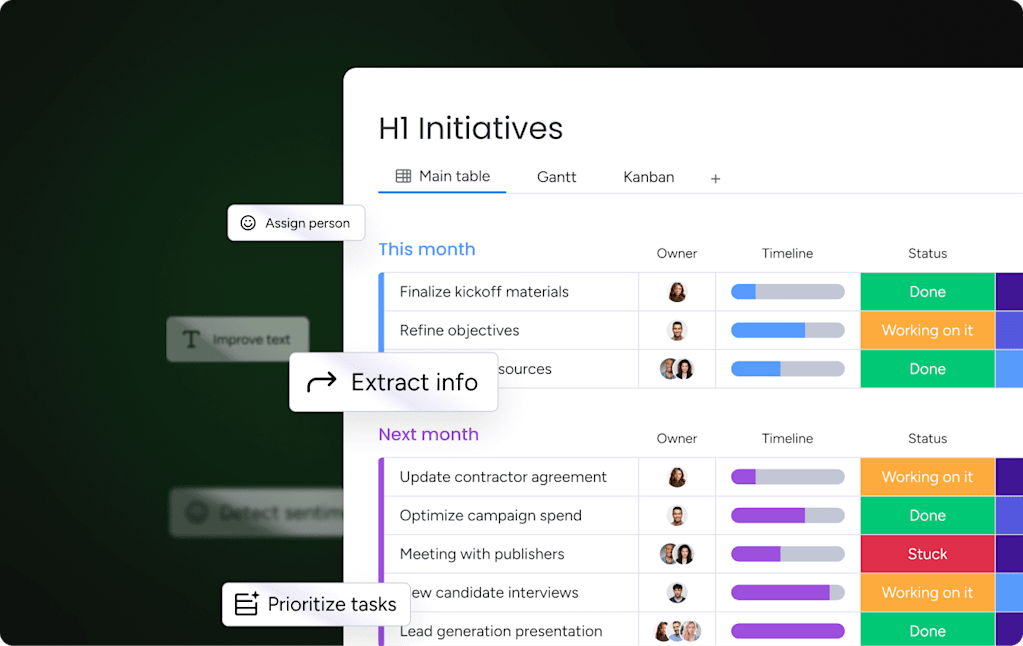
AI Blocks add automated checks to your commission workflow without any code. Set a threshold, and the Custom action block flags any payout that looks off, like a commission far above a rep’s normal range. Your team reviews the outlier before it reaches payroll instead of cleaning up after it.
Pull contract details into deals with AI extraction
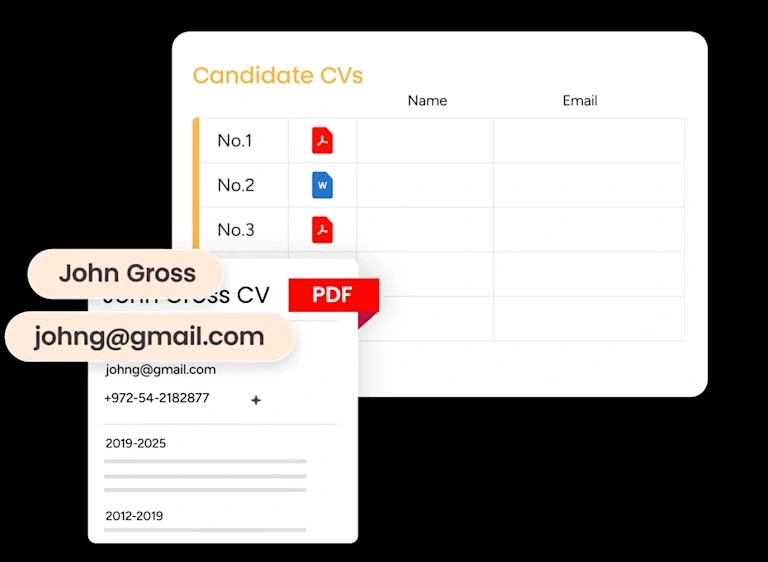
When payouts depend on contract terms, manual data entry invites mistakes. The Extract information block reads contracts and invoices, then updates the deal record automatically. Commission calculations stay tied to what was actually signed, and reps skip the busywork of re-keying details.
Assign deals to the right tier with AI categorization
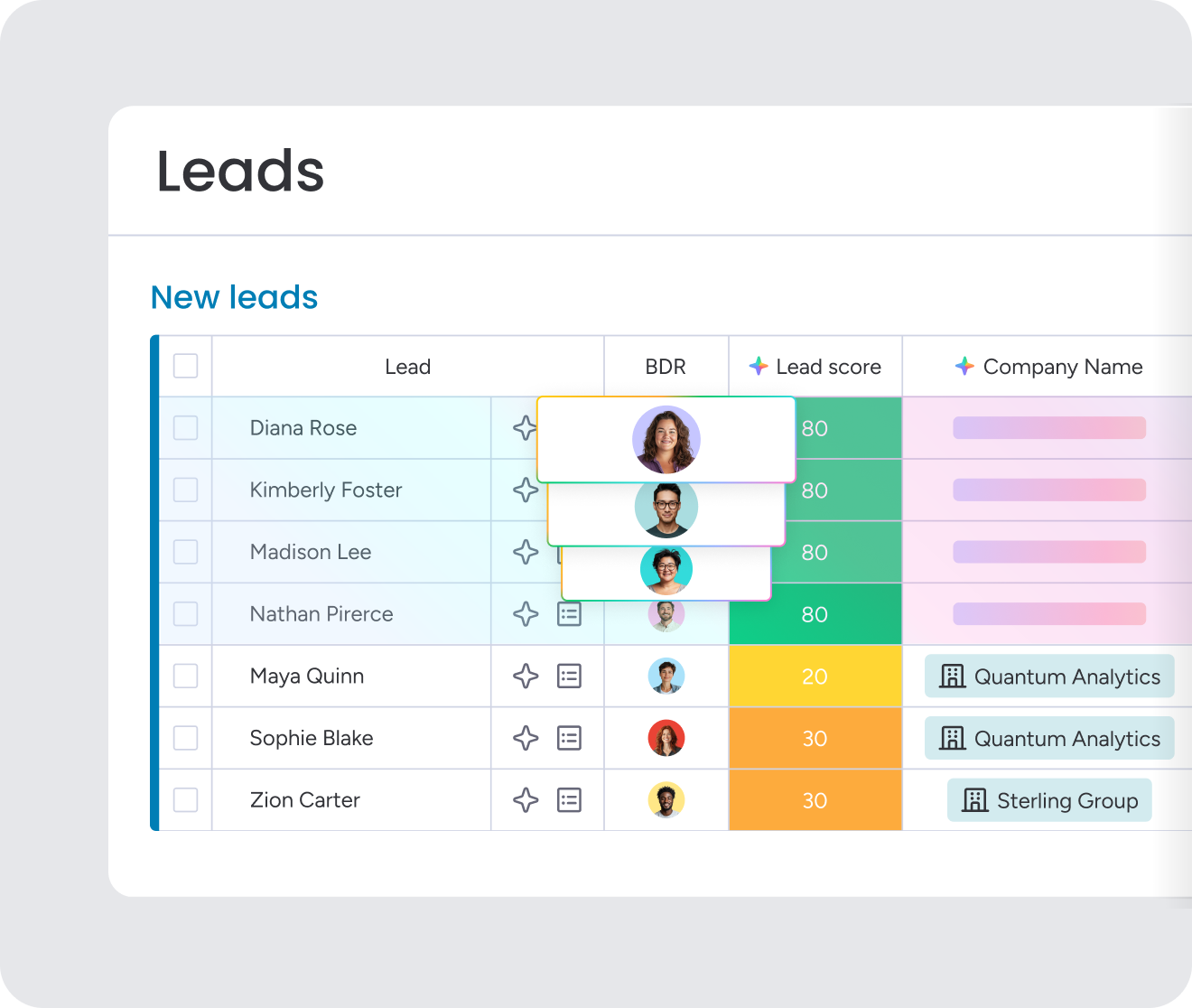
Misclassified deals lead to wrong payouts and frustrated reps. The Categorize block places each deal in the correct commission tier or product line based on its details. That cuts classification errors and keeps your payout rules applied consistently across the team.
Build custom calculators and earnings dashboards with monday vibe
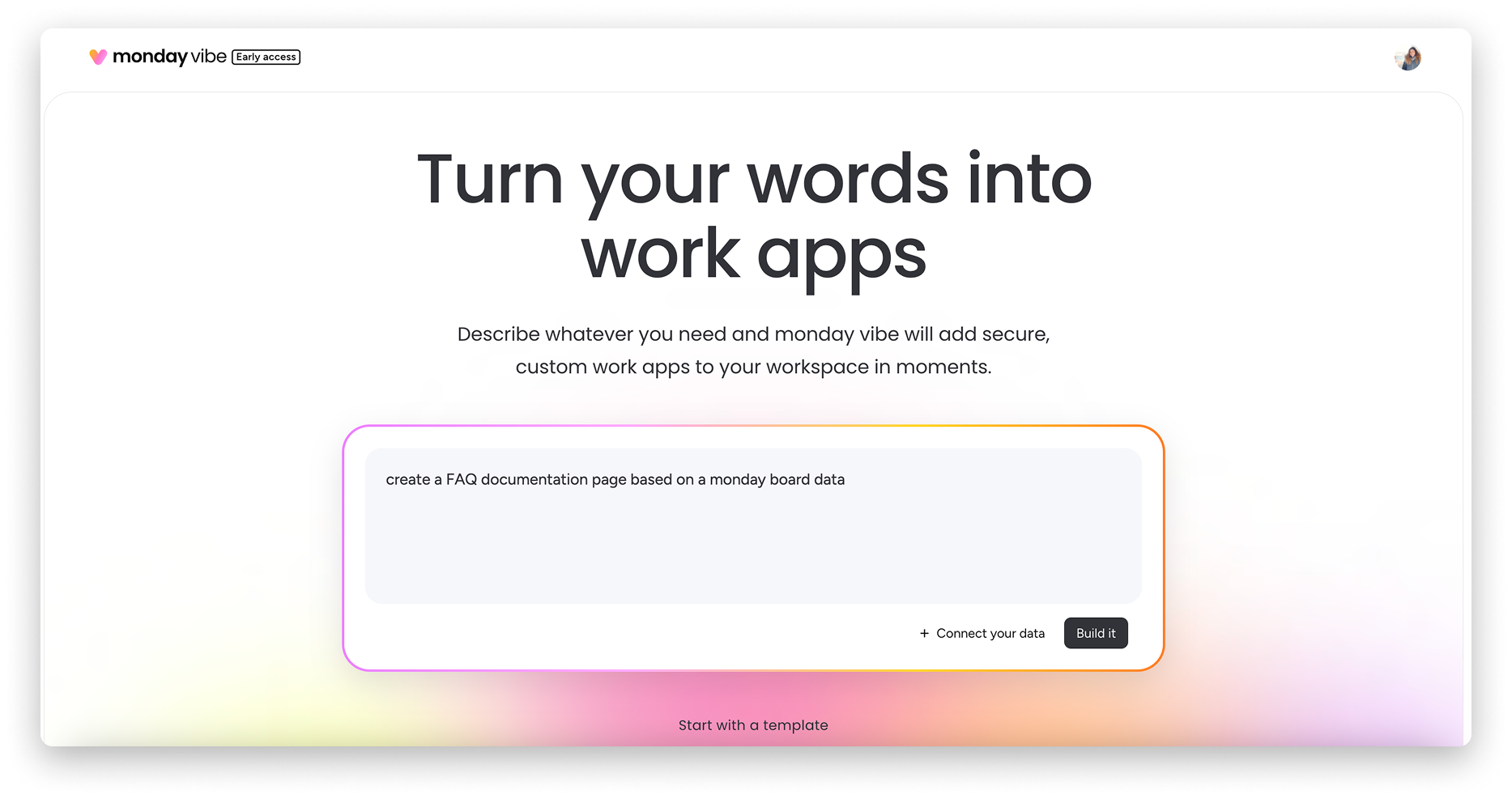
monday vibe turns plain-language prompts into working tools, so you can create a commission calculator without writing code. It pulls deal data automatically, applies your rate logic, and gives each rep a personalized earnings dashboard to track progress toward the next tier. Role-based access controls keep each user’s view limited to what they should see.
Take control of your sales compensation process
Sales commissions can stay collaborative between sales and finance rather than becoming a recurring standoff. Once you move away from disconnected spreadsheets and manual data entry, much of the friction disappears. Accurate, transparent tracking builds rep trust and keeps attention where it belongs: on closing the next deal.
A strong platform ties deal data directly to payout calculations, giving the business one reliable source of truth. That makes it easier to update comp plans, catch errors before they become payment issues, and forecast liabilities with more confidence. As the company grows, that alignment keeps operations stable and efficient.
Try monday CRMFAQs
How much does commission tracking software cost?
Pricing for commission tracking software depends on team size and how complex the compensation plan is. Entry-level tools often start around $25 per user each month, while enterprise systems are typically priced through custom quotes based on scope and implementation requirements.
Can sales commissions be tracked directly inside a CRM?
Yes, sales commissions can be tracked directly inside a CRM. Flexible Formula Columns and no-code automations make it possible to calculate payouts from existing deal data. Teams use monday CRM to manage compensation plans within the same environment, which removes the need for a separate platform or spreadsheet exports.
How long does commission tracking software implementation typically take?
Implementation timelines range from a few days to several months. The deciding factor is usually compensation complexity. CRM-native options can often be configured in days or weeks, while dedicated enterprise platforms may require three to six months and substantial project resources.
Is there free commission tracking software available?
Truly free commission tracking software is uncommon, though some vendors offer limited freemium versions or short-term trials. In practice, most teams either pay for dedicated software or build basic workflows within an existing paid CRM.
How does commission tracking software support ASC 606 compliance?
Commission tracking software helps support ASC 606 compliance by preserving a complete audit trail that shows exactly which plan version applied to each deal. It also records when commission expenses should be recognized so timing aligns with the transfer of goods or services.
What is the difference between commission tracking software and incentive compensation management?
The biggest difference is the level of complexity each category is meant to support. Commission tracking software calculates payouts from closed deals for teams with relatively straightforward plans. Incentive compensation management platforms extend much further, handling multi-variable structures, territory mapping, and quota planning for enterprise organizations.