
How Brett, monday CRM’s AI meeting prep agents, builds a brief before every customer call, and how to set it up in five minutes.
The problem with meeting prep
I’m Dana, GTM lead for monday CRM. I spend a lot of my week in meetings with customers, partners, and our own sales team. Until recently, I spent a lot of time preparing for them, too.
Before every call, I used to have the same routine of scrambling between multiple open tabs: LinkedIn, deal record, last email thread, call history, maybe a news search. I would piece it all together, write a few notes, and hope I didn’t miss anything. It took 20 minutes at least, sometimes more. Multiply that by four or five external calls a day, and meeting prep was quietly eating a big chunk of my week.
That’s why we built Brett, a meeting prep agent that lives inside monday CRM and does that work for you.
That’s the use case, and it isn’t magic. It’s your CRM data, connected and put in front of you at the right moment.
What Brett does: An AI meeting prep agent built into your CRM
Brett is monday CRM’s AI meeting prep agent. It connects to your Google or Outlook calendar, spots meetings with external contacts in your CRM, and writes a meeting brief before the call. All of this without a single trigger. It just runs.
Each brief pulls from what’s already in your CRM, plus external web and LinkedIn research, and is split into six parts:
- 1. Company intel: Account summary, industry, size, and recent signals from the account record and the web, like funding rounds and company news.
- 2. Participant context: Who’s on the call, their role, and their history with your team.
- 3. Interaction history: Past emails, calls, and notes logged to the deal or contact.
- 4. AI talking points: Suggested angles based on deal stage, open action items, and earlier conversations.
- 5. Risk alerts: Stalled deals, unanswered follow-ups, close dates that don’t add up.
- 6. Live Sidekick Q&A: Ask anything about the deal or contact from inside the brief.
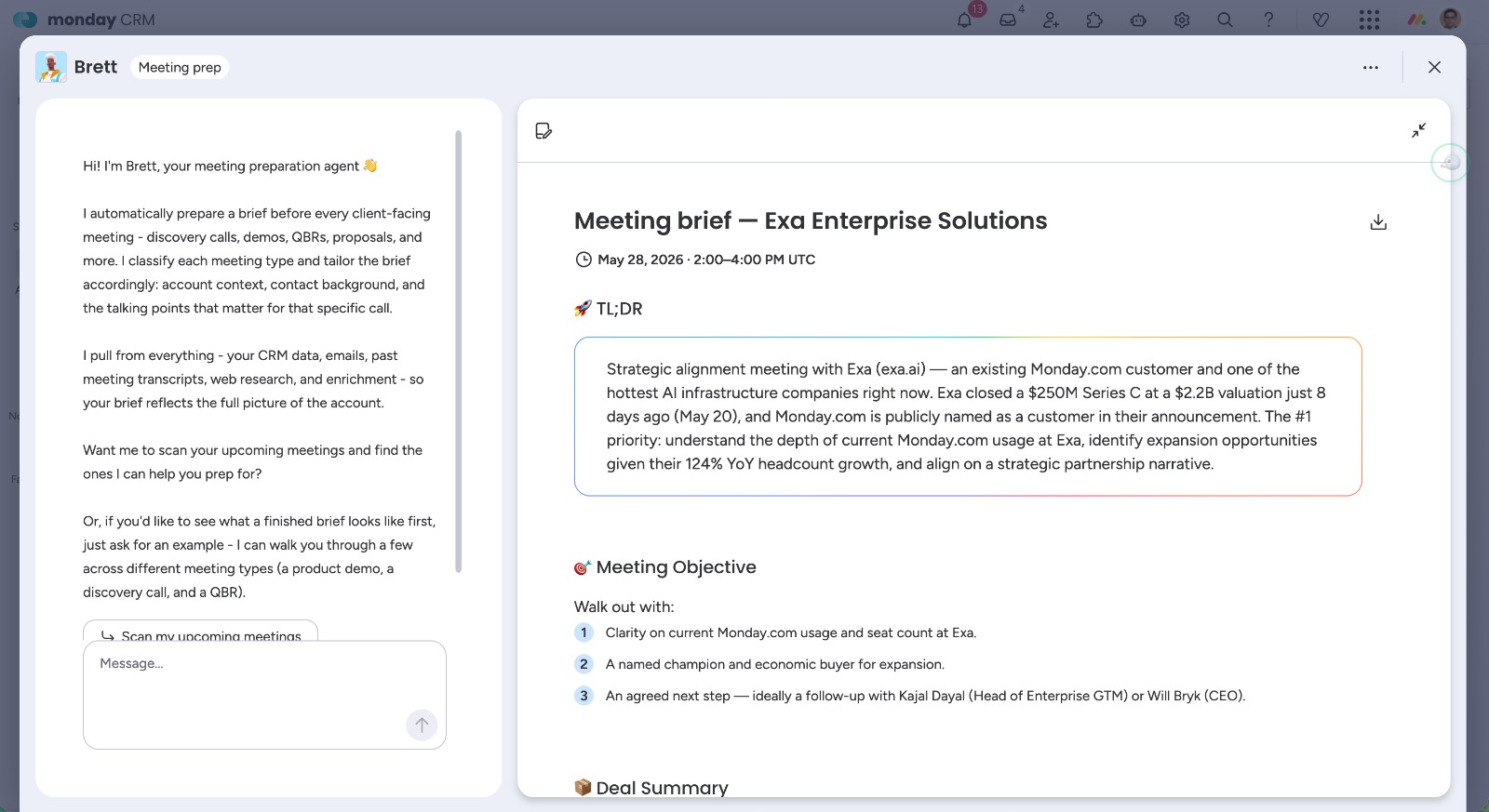
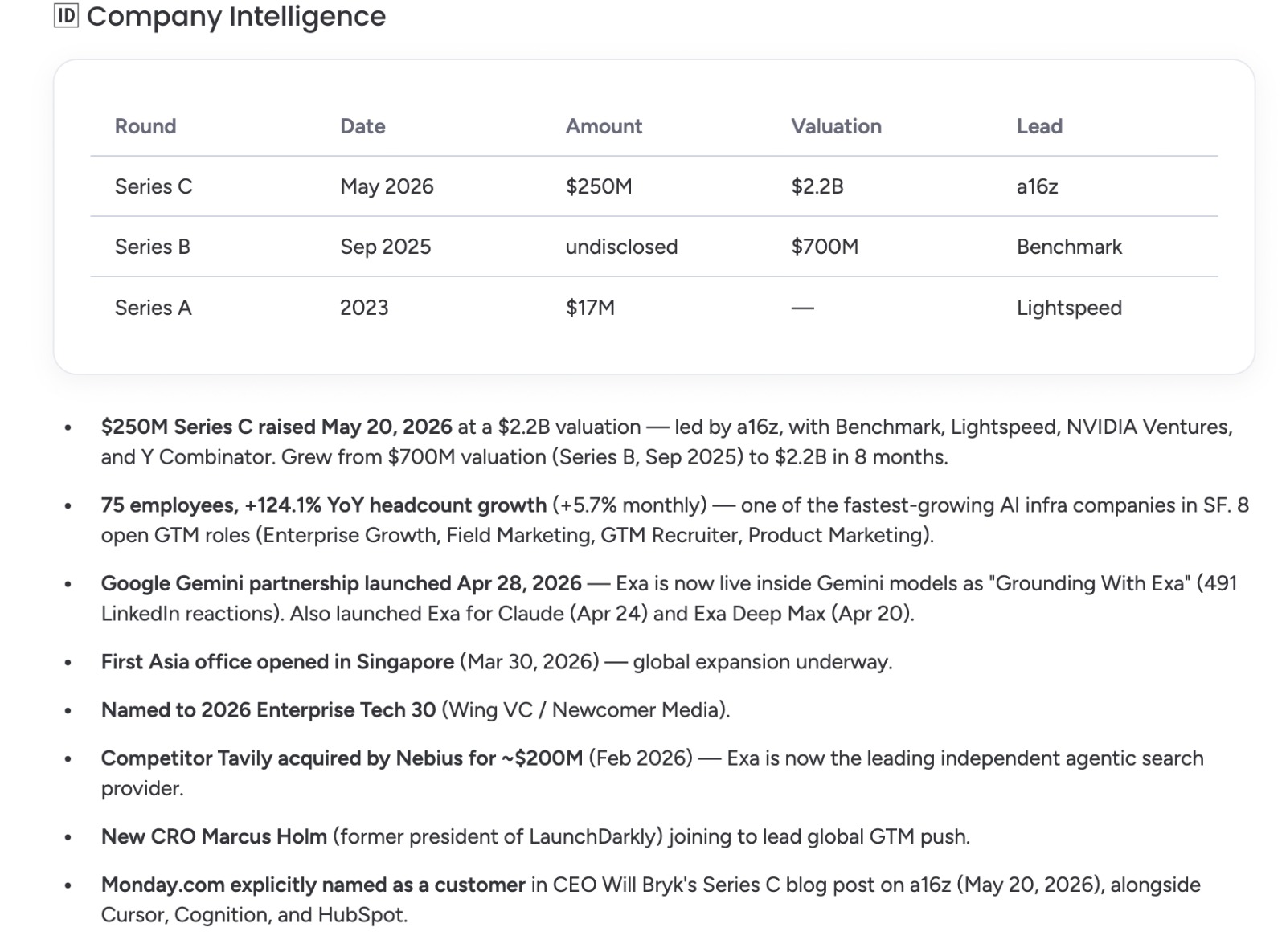
The brief appears on the deal item page in monday CRM. On mobile, you get a short version as a push notification, which is handy when you’re walking into the meeting.
You can also start from the monday CRM Home page. The Meetings panel shows your upcoming calls, and you can click Create brief on any of them to get the brief right there.
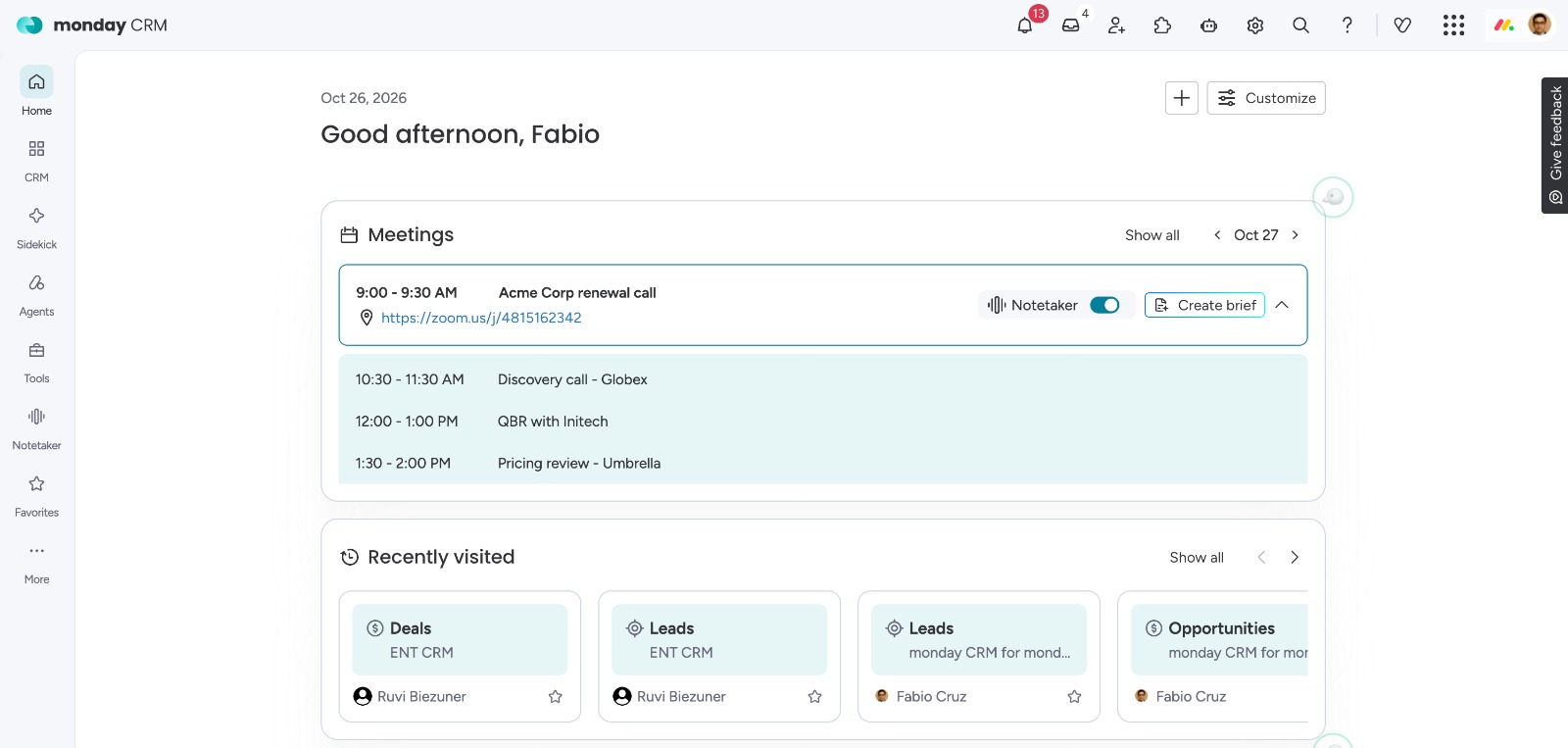
Because it works from the calendar invite, it doesn’t matter whether the meeting is in person, on video, or hybrid. If a matched contact is on the invite, you get a brief. And because it runs on its own every day, it’s one less manual step in your sales workflow. That’s the kind of automation you want an AI meeting agent to handle.
Why AI sales meeting prep beats the five-tab routine
The obvious win is the time you get back. The bigger one is what happens when you walk into a call actually prepared. You ask better questions. You catch the things that would have slipped, like a follow-up you owe or a deal that has been stuck in the same stage for weeks. You come across as someone who is attentive and on the ball, even after a week of back-to-back calls.
The information was always there, in the CRM, in email threads, and in meeting notes. An AI sales meeting prep agent just connects it so you don’t have to.
How to set up an AI meeting prep agent in 5 minutes
You need a connected Google or Outlook calendar and at least one contact matched in your CRM.
Once setup is done, Brett scans your calendar every day and writes a brief for upcoming meetings with matched contacts. For a same-day meeting, you can trigger a brief by hand from the agent page, or with Create brief on the CRM Home page.
What’s not there yet
These points are worth knowing before you set expectations with your team. These are on the roadmap:
- No reminder push 15 minutes before the meeting.
- No custom brief templates or your own prompts. The brief structure is fixed.
- The brief lives on the deal item page. Google Calendar as a direct surface is coming.
How I actually use it
For customer calls, I read the brief end to end. For internal meetings, I go straight to the risk alerts and open action items. I treat the AI talking points as a starting point, not a script.
It’s also become my outreach meeting prep agent. Before a first call or a discovery call, the participant context and interaction history show me exactly what we already know, so I don’t open with questions the prospect answered last month.
The thing I didn’t expect: it makes me better at logging things after calls, because I know the next brief will pull from whatever I just wrote. That’s the part most strategic sales meeting prep tools with AI miss. They’re only as good as the data behind them, and this one gives you a reason to keep it clean.
FAQs
What is an AI meeting prep agent?
An AI meeting prep agent reads your calendar and your CRM and writes a short brief before each meeting: who you’re meeting, what happened last time, and what to watch out for. Brett is the AI meeting prep agent built into monday CRM.
How does AI for meeting prep work in monday CRM?
Brett checks your connected Google or Outlook calendar every day. When a meeting includes an external contact from your Contacts board, it pulls company, contact, deal, and activity data from the CRM, adds web and LinkedIn research, and turns it into a six-part brief on the deal item page.
Which calendars does the meeting prep AI tool support?
Google Calendar and Outlook. Other calendar providers aren’t supported yet.
Does Brett search the web or LinkedIn?
Yes. Along with the data in your monday CRM account, Brett runs external web and LinkedIn research, so the brief can include company news, funding, and context on the people you’re meeting. The more you log in the CRM on contacts and deals, the better the brief.
Why didn’t I get a brief for a meeting?
Usually because no attendee is matched to a contact in your Contacts board, or because the meeting was booked for the same day. Match the contact, or trigger the brief by hand from the agent page or with Create brief on the CRM Home page.